SysToggle v1.0.0 lets Switch users toggle sysmodules without an overlay loader
Developer Authoria released SysToggle v1.0.0, a Switch homebrew app that manages Atmosphere sysmodules without nx-ovlloader to avoid 0xFFE memory crashes.
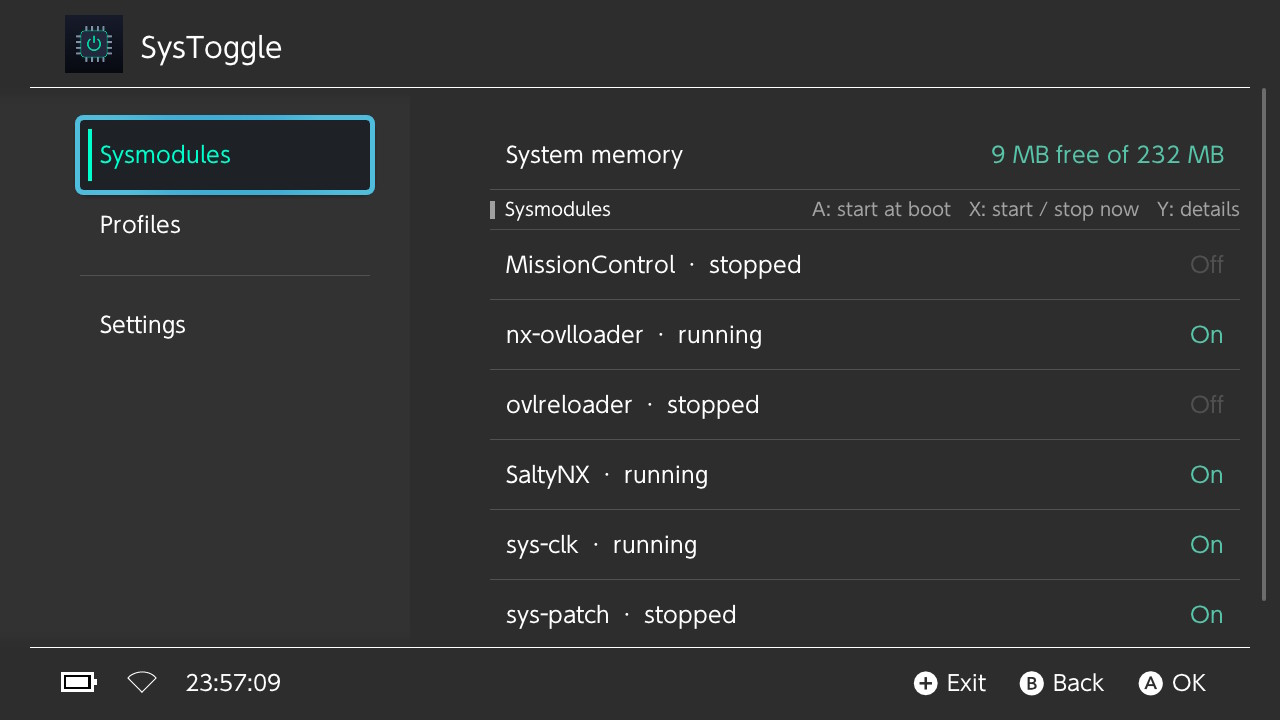
Developer Authoria has released SysToggle v1.0.0, a standalone homebrew app for toggling Atmosphère sysmodules directly on a modded Nintendo Switch. Tested on firmware 21.1.0 with Atmosphère 1.12.0 and 1.12.2, the tool eliminates the need to connect to a PC over MTP or keep nx-ovlloader running in the background.
On recent Switch firmware, sysmodules share a tight memory pool with Atmosphère. Loading heavy LayeredFS mods, such as translation patches for The Legend of Zelda: Tears of the Kingdom, can exhaust ams_mitm memory and trigger std::abort() called (0xffe) crashes before the title screen. Standard overlay managers require nx-ovlloader to stay active and ignore modules lacking a toolbox.json file, like sys-clk.
Built with borealis, SysToggle scans atmosphere/contents for every installed sysmodule and pulls names from toolbox.json, an internal list, or main.npdm. Users can toggle boot2.flag states, start or stop supported modules live, check system memory headroom, and switch between saved profiles like “TotK” and “Normal” with a one-press reboot. Note that translations other than English and Turkish are machine-assisted.
To try it:
- Download
SysToggle.nrofrom the releases page. - Copy the file to
sd:/switch/. - Launch it from the Homebrew Menu.