ACNH Power Pockets v1.3.0 adds 113 catalog collections and type filters on Switch
ACNH Power Pockets v1.3.0 for Nintendo Switch (Atmosphère) adds 113 item collections and ZL/ZR category filters to the in-console save editor.
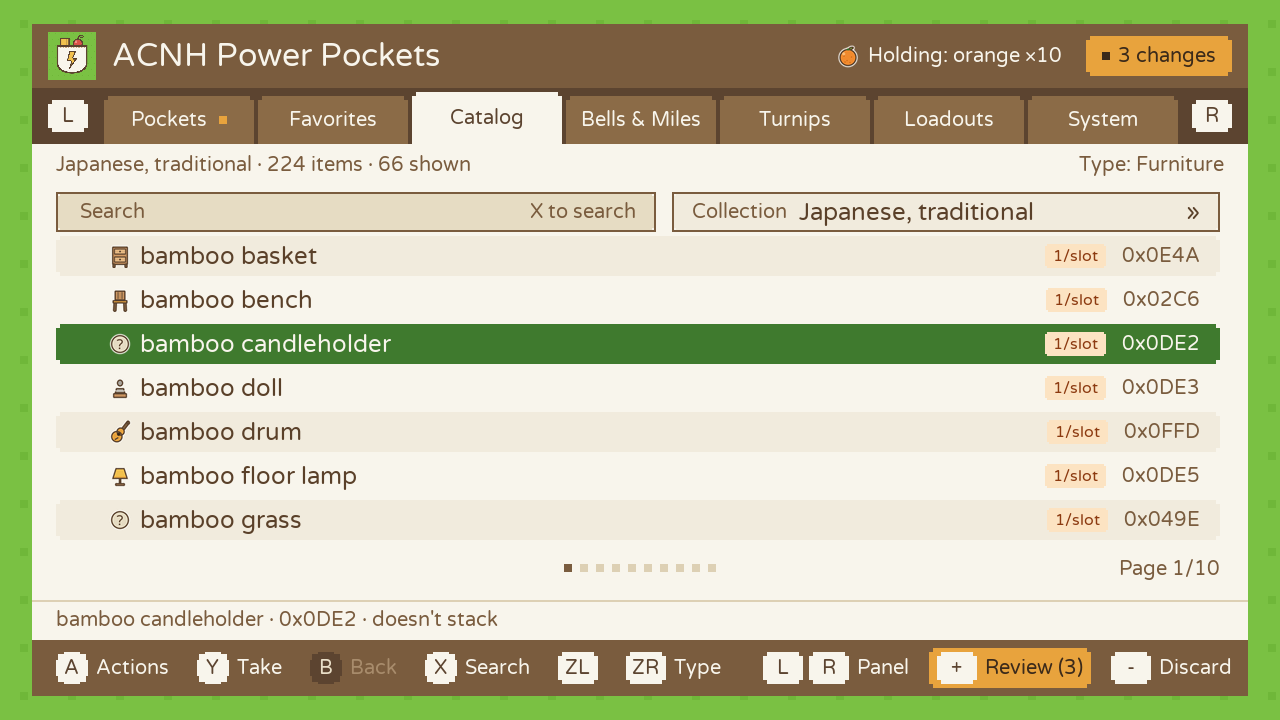
ACNH Power Pockets, a homebrew save editor for Animal Crossing: New Horizons on Nintendo Switch running Atmosphère, has updated to version 1.3.0. Tested on one console and one save running game version 3.0.3, the update lets you browse 113 grouped item collections inside the Catalog without typing individual item names.
A new selector next to the Catalog search bar organizes items into five groups: styles, 49 furniture series, 46 Happy Home Academy (HHA) themes, six clothing styles, and 11 clothing themes. Pressing A opens a collection alphabetically, B steps back, and Y drops a chosen item directly into an empty pocket slot. The release also includes a hand-curated traditional Japanese style collection of 224 items, plus ZL and ZR filters for All, Furniture, Walls, floors & rugs, Clothing, and Other. Pressing X now triggers a search from any Catalog page.
The collections rely on a generated item_collections.txt file sourced from January 2022 community data, meaning items from game updates 2.0 and 3.0 are not grouped yet and appear under Other. The underlying save engine is unchanged, though the app writes directly to your save file with no warranty and can corrupt an island if something goes wrong.
To install or update:
- Back up your save with Checkpoint or JKSV and copy it to a PC.
- Extract
ACNH-Power-Pockets-v1.3.0.zipto your SD card root, overwriting existing files. - Close Animal Crossing completely, hold R while launching the game to open the Homebrew Menu, and start the app offline.