Stardual Valley Moves Stardew Valley Menus to a Second Screen
Stardual Valley adds a second-screen interface for Stardew Valley on dual-screen Android handhelds like the AYN Thor via Cinderbox.
PC (Windows) → Android · Mod
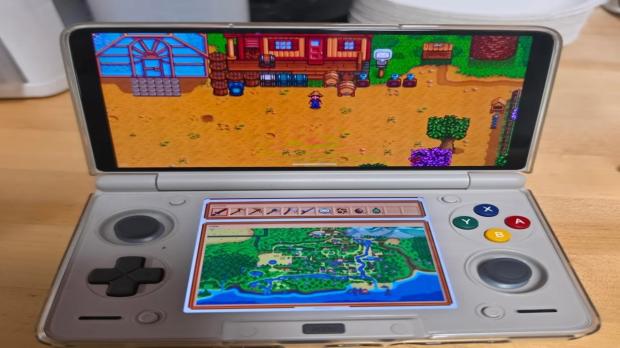
Stardual Valley moves inventory, maps, crafting, and menus to a second display for Stardew Valley running on dual-screen Android handhelds such as the AYN Thor. You run the desktop version of Stardew Valley on Android through Cinderbox and drop the free mod in. [https://www.tweaktown.com/news/114754/stardew-valley-mod-brings-inventory-maps-crafting-and-more-to-a-second-screen/index.html]
The second screen shows the main map, farm journal, bundles, calendar, people, crafting progress, an integrated wiki on residents and seeds, and an optional cheat menu. It pulls window frames, fonts, and icons straight from your running game so the layout matches the main screen. It also lets you hide the HUD, map L and R buttons to backpack rows, and add animated backpacks. [https://www.tweaktown.com/news/114754/stardew-valley-mod-brings-inventory-maps-crafting-and-more-to-a-second-screen/index.html]
The modder built most of the code, graphics, and UI with generative AI. It targets Cinderbox and may work with other Android launchers. Testing so far covers only the AYN Thor, so bugs may remain. [https://www.tweaktown.com/news/114754/stardew-valley-mod-brings-inventory-maps-crafting-and-more-to-a-second-screen/index.html]