NXCloud brings an Xbox-style cloud gaming launcher to Switch homebrew
NXCloud is a beta homebrew client that streams Xbox Cloud Gaming on Switch from a home screen, with its own player.
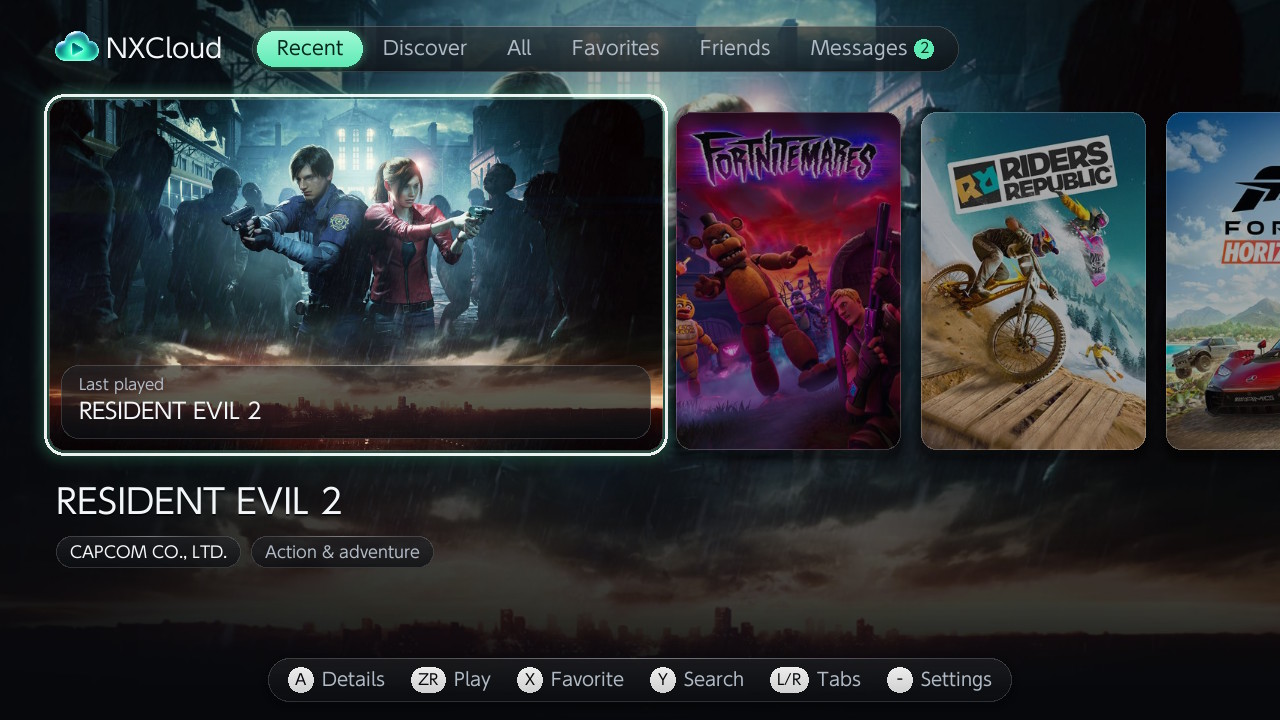
NXCloud is a new beta client that streams Xbox Cloud Gaming on a Switch that runs homebrew. It has a home screen that works like the Xbox one, and it uses its own player instead of the libnxbox route.
The author says libnxbox works, but it’s clumsy. It has no game menu, so you need an NSP forwarder for every game, and you can’t leave a running game for anything else. NXCloud fixes that with a launcher that shows your library, Game Pass Discover lists, favorites, search, and the last game you played. Its player runs at 720p or 1080p with sound, rumble and gyro aiming, and it lowers quality when the connection gets bad. Press + and - together in a game to open an Xbox-style guide.
You sign in with your Microsoft account using a code on your phone, so the password never reaches the console. You need a Game Pass Ultimate account or owned games that support cloud play. Open the homebrew menu in title mode (hold R when opening a game), because the album mode doesn’t have enough memory for video.
To report bugs, open a GitHub issue and attach log.txt and stream.log from the nxcloud folder. The author says the project uses AI in its development.
My take: forwarders were a workaround. NXCloud adds the launcher that libnxbox lacked.