Ace Combat X Recompilation v0.1.0-rc2 Adds Controller Vibration and Rain Refinements
Ace Combat X: Skies of Deception on Windows gets controller feedback, refined cockpit rain, and native 60 FPS support.
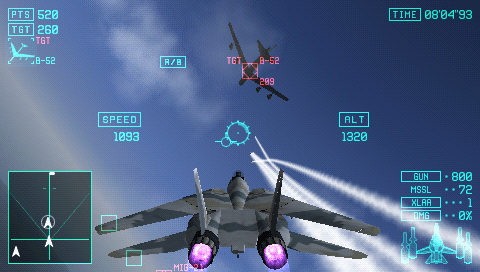
The Ace-Combat-X-Recompilation project for Windows, maintained by uzir1127 and based on sal063’s original work, has reached the v0.1.0-rc2 release candidate stage. This project brings Ace Combat X: Skies of Deception, an aerial combat game originally released for the PlayStation Portable, to native Windows execution without requiring separate compiler toolchains like LLVM or Python.
This update introduces controller vibration for gunfire, special weapon launches, damage, and low-speed flight buffet. Feedback starts automatically during gameplay, with buffet beginning at 700 km/h and scaling up toward 350 km/h. Players can adjust strength or test feedback directly through the F4 menu under input settings. In addition, the update refines the renderer’s rain effects with finer, softer tapered streaks and subtle moving droplets across the cockpit glass.
How to Try It
- Download the Windows ZIP asset from the Releases page on GitHub.
- Extract the archive to a local directory.
- Drop a US region ISO of Ace Combat X (ULUS10176) into the main folder. The game needs 64-bit Windows with a working Vulkan driver and Media Foundation.
- Run Play.bat to start the game.
Previous updates to this branch include native 60 FPS support that does not speed up the game engine, integrated HD texture packs, upscaled text and cutscenes, and custom binding menus accessed via F4. Keep memstick/, pspreco.toml and controls.ini when updating, because saves and personal settings are not in the ZIP.