Bleach: Heat the Soul 7 gets a native PC static recompilation with 60 FPS and GGPO rollback
Developer krprojecthts released v1.0.0-beta of a native Windows static recompilation for PSP fighter Bleach: Heat the Soul 7 with 60 FPS and online rollback.
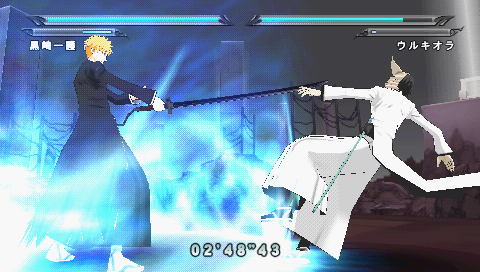
Developer krprojecthts released v1.0.0-beta of a native Windows static recompilation for Bleach: Heat the Soul 7 (NPJH50275), the 3D arena fighting game originally released for PlayStation Portable. The build runs natively on 64-bit Windows 10 and 11 without an emulator, doubling the original framerate to a locked 60 FPS and adding GGPO-based rollback netcode.
Static recompilation translates the original PSP executable directly into native PC code while relying on your own game dump for assets. That approach lets the project add fighting game tools on top of the original roster of over 80 characters, including Hell Verse Shuren and restored alternate color palettes.
What the PC build adds
- Online multiplayer: Custom GGPO rollback supporting 1v1, Tag Team, and 4-player online Battle Royale with public or private lobbies, live chat, and independent cameras per player.
- Training and replays: Real-time frame data readouts, AI dummy recording and playback, frame-by-frame replay review, and direct MP4 export.
- Visuals and modding: Upgraded stage-matched character lighting, a custom soundtrack manager, built-in texture dumping and live reloading, plus XInput controller and keyboard remapping.
How to set it up
- Download
Bleach_Heat_the_Soul_7_Beta_Version_1.0.zipfrom the release page and extract it to a dedicated folder. Do not launch the game from inside the ZIP archive. - Obtain a clean, unmodified Japanese v1.01
.isoof Bleach: Heat the Soul 7 (NPJH50275). Pre-patched English translation ISOs will not work because modified executable offsets break compatibility. - Dump your decrypted executable using PPSSPP: open Settings -> Tools -> Developer tools, enable Dump decrypted EBOOT.BIN on game boot, launch the ISO briefly, then copy
NPJH50275.BINfrommemstick\PSP\SYSTEM\DUMP\and rename it toEBOOT.BIN. - Place both your
.isoand renamedEBOOT.BINnext toBleachNative.exeand launch the executable.
PSP static recompilations remain rare compared to the N64 and Xbox 360 scenes, and this build ships with working 4-player rollback netcode and frame-data tools.