Yakuza 2 gets a native Windows port via static recompilation
Developer IvanBarbosaFilho released Yakuza 2 - PC Port V1.0.0, a static recompilation of the PS2 game using PS2Recomp and PCSX2's renderer.
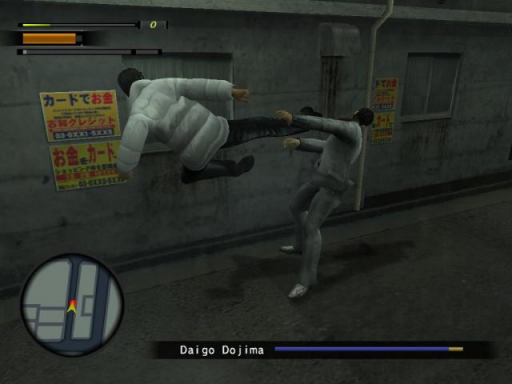
Developer IvanBarbosaFilho has released V1.0.0 of Yakuza 2 - PC Port, a native Windows build of the PlayStation 2 game created through static recompilation. The original PS2 binary was translated into C++ and compiled directly as a Windows executable.
The project uses PS2Recomp, a PlayStation 2 static recompiler, and pairs the recompiled code with PCSX2’s Graphics Synthesizer renderer running on DirectX 11. While the GitHub release tag is V1.0.0, the project’s README lists the status as a 0.1.0 beta: the game is playable from the start, though not every chapter has been tested yet. While the catalog listing mentions Linux, the current release package and README are built for 64-bit Windows 10 and 11 (cross-compiled from Linux).
Running natively allows the port to add several options directly into the game:
- Frame rate and resolution: Switch between the original 30 FPS and 60 FPS, scale internal resolution from 1x up to 4x, and choose between 4:3, 16:9, or stretched aspect ratios.
- Over-the-shoulder camera: An optional camera controlled via the right analog stick or mouse, reverting to the original cameras during dialogue, events, and Heat Actions.
- Controls: Keyboard and mouse support (using mouse buttons for attacks and grabs) alongside plug-and-play support for Xbox, PlayStation, and other controllers.
How to try it
You need a 64-bit Windows 10 or 11 PC with a DirectX 11 GPU and a processor supporting SSE4.1 (any CPU from roughly the last 12 years). No game assets are included in the release.
- Download the release ZIP from the GitHub repository and extract it to a folder.
- Supply your own USA PS2 disc image (
.iso) of Yakuza 2 (SLUS-21348). - Launch
Yakuza.exeand select your.isofile when prompted. The program verifies the image and saves its path toYakuza.iniso you only have to do this once.
In-game, press F2 on the keyboard or L3 on a controller to open the options menu, or F11 to toggle fullscreen. Memory card saves are stored in memcard0.ps2 next to the executable, and each session writes a logs\play.log file for bug reports.