vitaterm 0.2.0 puts Claude Code on your PS Vita
vitaterm 0.2.0 turns a PS Vita into a wireless screen and controller for Claude Code on your computer.
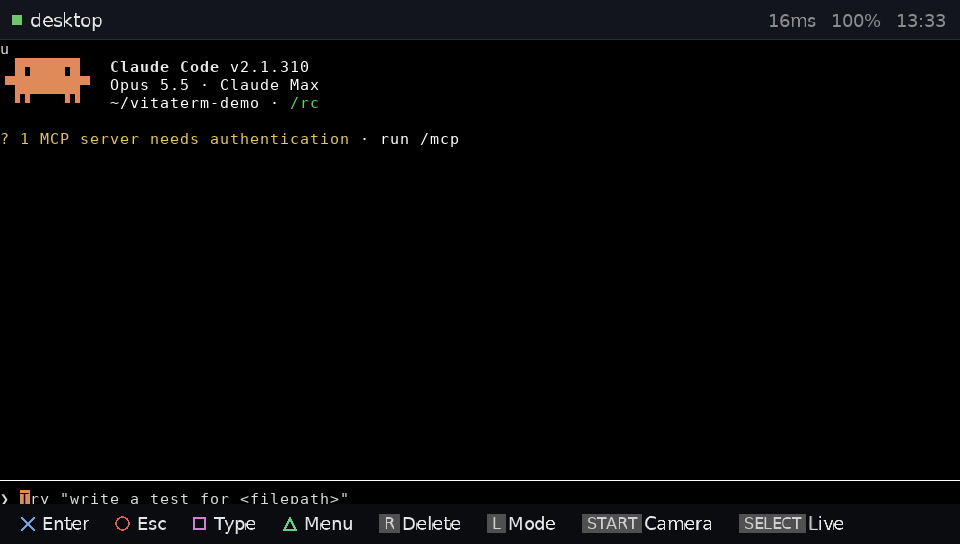
vitaterm 0.2.0 turns a PS Vita into a wireless screen and controller for Claude Code running on your computer. The Vita shows the session and sends your keys over an encrypted Wi-Fi link. You pair the two with a six-digit code shown on both screens.
It’s a fork of ds-claude-terminal, a DS homebrew by logancarrillo that does the same for the Nintendo DS. The server and protocol come from that project.
Cross approves Claude’s questions, Circle stops it, and Square opens the Vita keyboard. The Triangle menu switches sessions and holds keys the Vita lacks, like Ctrl+C. The camera sends a picture to the computer and adds its path to your next prompt.
You need a Vita or PS TV that runs homebrew through HENkaku, plus Claude Code logged in on a Mac, Linux machine, or Windows PC through WSL2.
- On the computer, run
pipx install git+https://github.com/jmverges/vitaterm, thenvitaterm setup. - On the Vita, install
vitaterm.vpkfrom the releases page with VitaShell. - Open vitaterm on the Vita, pick your computer, then run
vitaterm pairand check the six digits match.
The author calls it early. It has run on a Vita 1000 with Ensō. The camera was only tested in the Vita3K emulator, so the author asks for feedback from PS TV owners, since that model has no touch screen or camera.