Sakura Wars: So Long, My Love Rebloom v0.1 brings PS2 recomp to desktop and mobile
Sakura Wars: So Long, My Love Rebloom v0.1 translates PS2 code to C++ for Windows, Linux, Android, and iOS.
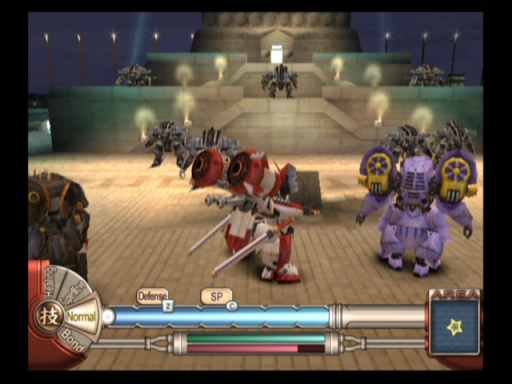
[Sakura Wars: So Long, My Love Rebloom](https://github.com/dea7hsmiless/Sakura-Wars-So-Long-My Love-Rebloom) hit v0.1 on 2026-11-24, translating the PlayStation 2 tactical RPG into native C++ without a console emulator or BIOS. The release targets Windows, Linux, Android, and iOS, and requires your own game discs.
Static recompilation translates PS2 code ahead of time into a native program. Here, the CD/DVD server, the Sakuya 2 sound engine, and the CRI ADX driver run as guest code on an interpreted IOP, while the host runtime handles disc reads and module loading.
A single build accepts Disc 1 (SLUS_219.27, English voices) or Disc 2 (SLUS_219.30, Japanese voices), which differ by 28 bytes. Importing both lets you switch voice tracks. Features include internal resolution scaling from 1x to 4x, 4:3, 16:9 stretch, and Fill display modes, temporal de-dither, HD texture overrides, memory-card saves, and custom controller or keyboard bindings. Mobile builds include touch controls, an analog stick, haptics, tap-to-advance, and Bluetooth controller support.
Setup and limits
- Windows: Extract the ZIP, run
Rebloom Launcher.exe, import Disc 1 (and Disc 2 for Japanese voices) via Install, and press Play. Requires Windows 10/11 x64 with Direct3D 12 or Vulkan, plus NTFS or exFAT for the 7.17 GB Disc 2. - Linux: Run the AppImage or extract the tar.gz archive, import Disc 1 via Install, and press Play. Requires x86-64, glibc 2.39+, and Vulkan 1.1; data lives in
~/.local/share/rebloomorREBLOOM_HOME. - Android and iOS: Sideload the arm64 APK on Android 9+ with a Vulkan GPU supporting at least seven storage buffers, or self-sign the IPA for iOS 16.4+ arm64. Remove older Rebloom installs on iOS first so cached assets do not linger.
Early 0.1 builds often need testing across full playthroughs.