Rewraithed Beta 10 fixes Dreamcast Raziel lighting in Soul Reaver PC port
The open-source Legacy of Kain: Soul Reaver PC port Rewraithed reaches Beta 10 (v0.99j), fixing Dreamcast model shading and fullscreen display timing.
PS1 → PC (Windows) · Port
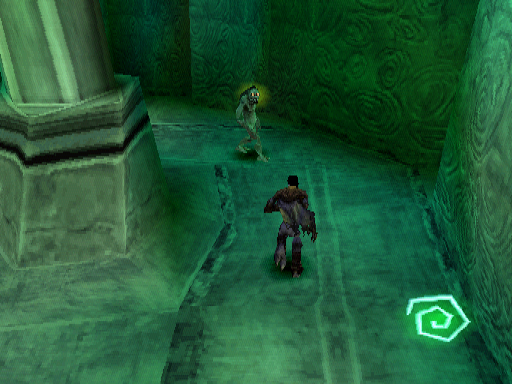
Developer fmil95 has released Beta 10 (v0.99j) of Rewraithed, an open-source Windows PC port of the PlayStation action-adventure game Legacy of Kain: Soul Reaver. The November 21, 2026 release focuses on visual fixes for Raziel’s Dreamcast character model, video scaling controls, and fullscreen display initialization.
Rewraithed builds on an existing PlayStation matching decompilation and uses AI coding agents to speed up porting and SDK development. Its long-term goal is to add an “Uncut” mode that restores reavers, glyphs, forges, boss fights, and the original ending cut during the game’s development.
In Beta 10, Dreamcast Raziel now uses smooth shading from vertex normals to match the PlayStation model’s lighting instead of appearing overly dark. The update also stops the bones modeled beneath Raziel’s scarf and collar from clipping through, and prevents the inner side of his body from showing around his neck. On the display side, launching in fullscreen at a refresh rate different from your Windows desktop now waits for the monitor to switch modes before the intro logos play, and pressing F4 scales movies dynamically while they are running.
To try it today, you need a Windows PC and your own disc dump of the July 14, 1999 PlayStation prototype of Soul Reaver, as retail discs are not supported yet. Place your dump in the disc folder next to rewraithed.exe and rewraithed-launcher.exe. If you compile from source, you must target a 32-bit Windows build using Visual Studio 2022, CMake 3.24 or newer, and Python 3.
This is still a work-in-progress build with several known issues. Audio can occasionally turn unstable during specific gameplay segments, Rahab’s body renders visibly through underwater surfaces, warpgates do not display properly when cycling destinations, and toggling the Show VRAM option in the debug menu causes erratic behavior.