NxFileViewer fork adds batch checks and NSZ/XCZ support on Windows
A Windows fork of NxFileViewer adds batch checks of Switch backups, NSZ and XCZ support, and batch renaming. You need your own keys.
Switch → PC (Windows) · Tool
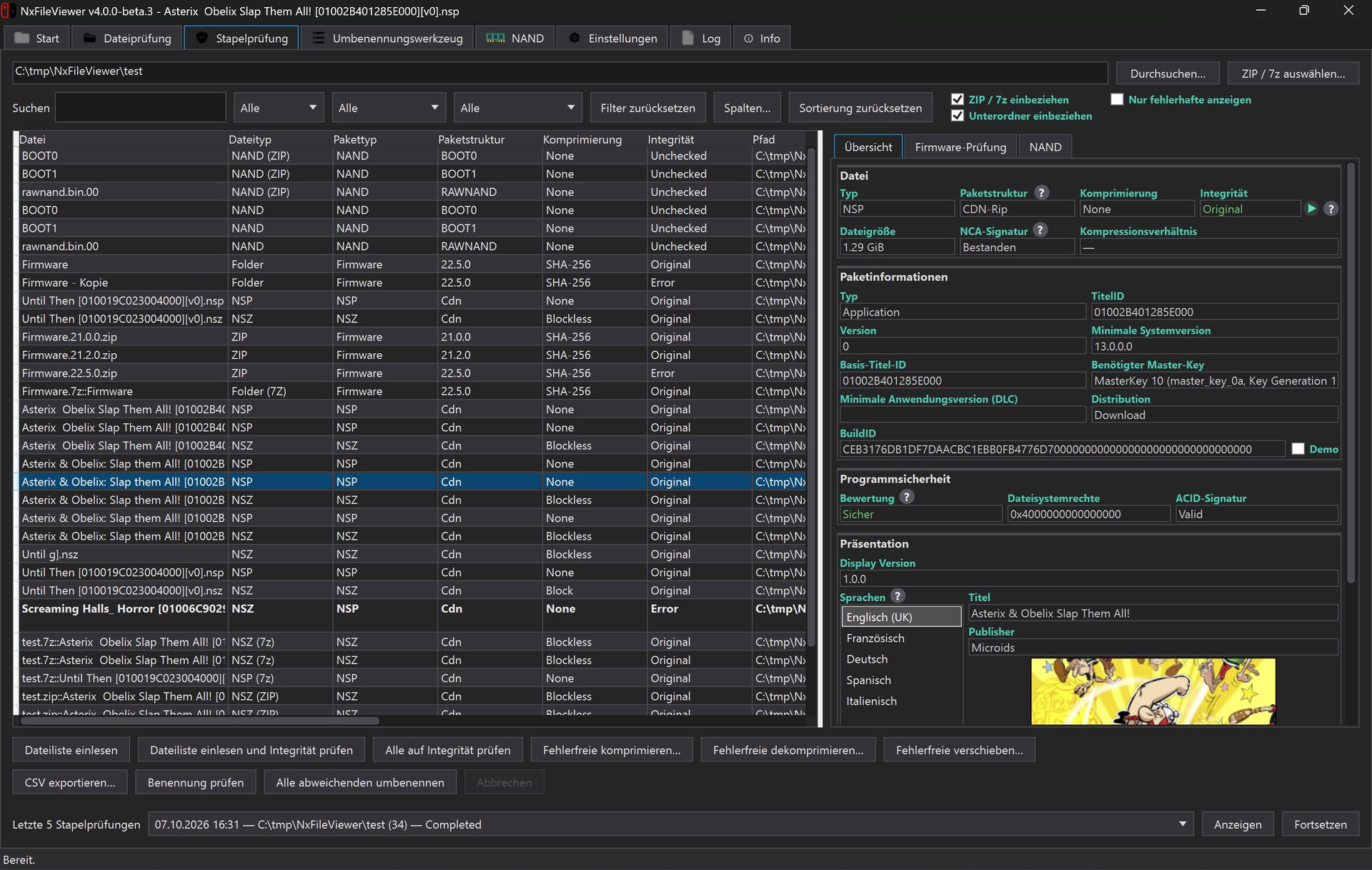
A new fork of NxFileViewer, a Windows desktop tool for browsing and checking Switch backups, adds batch verification and support for compressed NSZ and XCZ files. The fork comes from GBAtemp member mic5, who builds on the original tool by Myster-Tee.
The fork is built for checking many files at once. It verifies NSP, NSZ, XCI and XCZ files in batches, shows NCA hash and header-signature results for each file, and reads compressed packages without unpacking them first. It also includes batch renaming with a simulation mode, firmware checks against reference hashes, and interfaces in English, German, French and Spanish. The author says reading compressed files may still decode them internally and use temporary disk space.
How to try it:
- Download a Windows x64 or x86 build from the releases page.
- If you don’t want to install the .NET 8 Desktop Runtime, pick the self-contained build.
- Provide your own keys. None are included.
The author asks for bug reports with the app version, file format, steps to reproduce and a log with private information removed. Keys and game files should stay out of them.
