Need for Speed: Hot Pursuit 2 PS2 Port Reaches Version 0.13
Version 0.13 of the Need for Speed: Hot Pursuit 2 PC port cuts CPU usage, adds new disc regions, and refines Vulkan rendering.
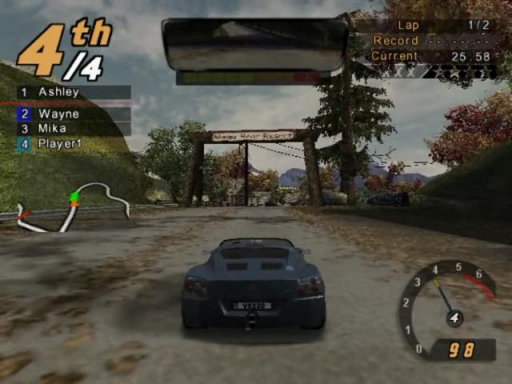
ZloiKILLER has pushed version 0.13 of nfshp2-port-win, a static recompilation of the PlayStation 2 version of Need for Speed: Hot Pursuit 2 for Windows. This release brings performance improvements and streamlined installation.
The port requires Windows 10 or 11 (64-bit) and a graphics card with Vulkan. Players need their own copy of the game via a physical disc or an .iso file, supporting USA (SLUS-20362), Europe v1.00 and v2.00 (SLES-50731), Asia (SLPM-65181), and Korea (SLPM-67527) releases.
Performance and Rendering
The new build cuts CPU usage down to roughly a third of what version 0.12 required. Heavy drawing routines were rewritten, and the renderer now operates in its own dedicated thread. On test hardware running at 4x resolution, heavy scenes that previously hovered around 23 frames per second now lock solid at 60.
Graphics options now include a new Reflections setting in the graphics menu, offering PS2, Advanced, and High modes. The rear-view mirror draw distance now respects your overall draw distance setting, and a bug that caused freezes after changing graphics settings has been patched.
Installation and Controls
If you are coming from version 0.12 or older, a fresh install is recommended. The setup program asks whether you want to Install or Update. Updating an existing folder replaces only the necessary port binaries while preserving your saves, replays, and configuration files. Installations can now read directly from a physical disc in a DVD drive or a mounted image without requiring an .iso file.
Steering logic at 60 frames per second has been adjusted to match original 30 frames timing so cars do not turn too sharply at high speeds. Keyboard controls are now decoupled from gamepad layouts, and four new gamepad layouts (E to H) add trigger controls. Profiles can now be switched without restarting the game.
How to Try It
- Download
speed.exefrom the Source code repository releases. - Run
speed.exe, select Install, and point it to your game disc image or a DVD drive. - Choose an installation folder and let it unpack roughly 3.6 GB of game data before launching.
