My Life as a Darklord gets a native Windows build in v0.2
The fan project mylifedarklord-recomp v0.2 runs the WiiWare game Final Fantasy Crystal Chronicles: My Life as a Darklord natively on Windows.
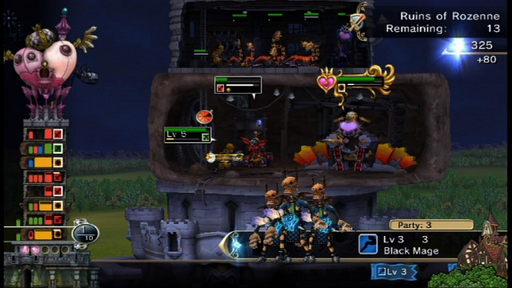
The fan project mylifedarklord-recomp released v0.2 on October 31. It’s a static recompilation of Final Fantasy Crystal Chronicles: My Life as a Darklord, the WiiWare game for the Wii, and this build runs it natively on Windows. You supply the game. The project supplies the code.
A static recompilation translates the game’s PowerPC executable into C++ once, and then you compile that C++ for your PC. A small runtime replaces the Wii hardware, IOS and the DSP. The project uses the same recompiler and runtime as mylifeking-recomp and chocobo-dungeon-recomp, so this is the third game from that codebase.
v0.2 drops the Python setup step. You need your own WAD file of the game, and the DLC WAD if you have it. The first start unpacks them into a game folder by itself.
How to try it
- Download
MyLifeAsADarklord-v0.2-win64.zipfrom the Releases page and unzip it. The zip gets attached a few minutes after the release goes up. - Put your WAD(s) in the same folder as
mylifedarklord.exeand run it. - Wait for the first start to build
gameandgame\dlc.
The game is played with the Wii Remote held sideways. With a gamepad, A is 2 (confirm) and B is 1 (cancel). On the keyboard, arrows move, X is 2 and Z is 1. F1 or Esc opens settings, F11 goes fullscreen and holding Tab fast-forwards. The full control list is in the zip’s README.txt.
Limits: the 39 items of the add-on pack are installed, but buying add-on content needs the Wii Shop, so that part doesn’t work. The README says the project runs on Linux too, but the v0.2 release zip is Windows only. A Linux build means compiling from source. The release notes don’t say how widely v0.2 has been tested, while v0.1 was confirmed by a tester on Windows.
The project calls itself an unofficial fan project, not affiliated with Square Enix or Nintendo.