JRPG Translator adds an AI translation overlay to Japanese games on Windows
A free Windows tool captures text from a running Japanese game and shows an AI translation overlay, with optional Anki study features.
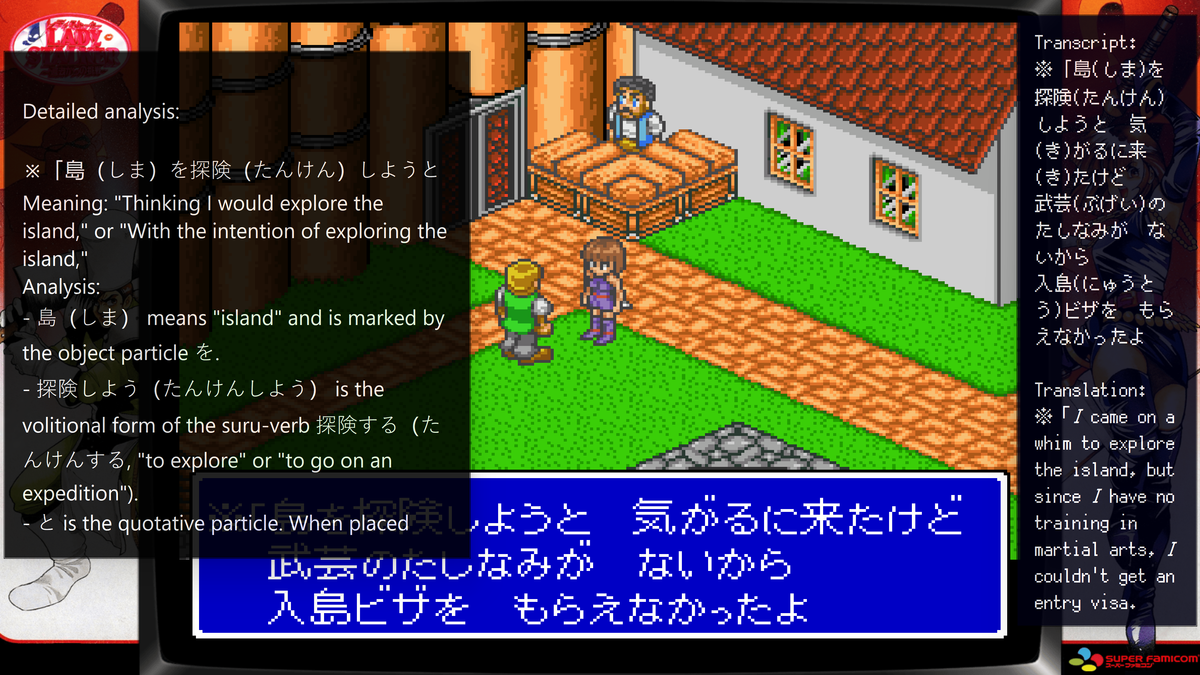
JRPG Translator is a free Windows tool that captures text from a running Japanese game and shows an AI translation in an overlay. It works by screen capture and does not modify the game. The poster says that means it works with emulators too.
The poster, who posts on GBAtemp as homebrewfan88, built it as a hobby project over the last year. There’s also audio translation for spoken dialogue. Optional study features show Kanji readings in a transcript and save grammar notes to a library. From there you can send a sentence to Anki, a flashcard app, with a screenshot attached. A fullscreen mode supports controllers, and an optional LaunchBox plugin loads overlay settings per game.
You need your own API key from Gemini or OpenAI. Google’s free tier may cover light use. The poster recommends the smaller, faster models, since answers need to arrive within one or two seconds. There’s no subscription, and you pay for requests up front. The repo link goes to an account called retrogamer0815, not the poster’s handle, so the author relationship is unclear. The poster admits there are probably still bugs. A reader’s question about other languages and Mac or Linux builds is in the thread, but the source shows no answer from the author.