Haze Recomp 0.1.11 brings PS3 Haze to Windows as a native port
Haze Recomp 0.1.11 is an experimental native Windows port of the PS3 game Haze. It needs your own ISO and still has large gaps.
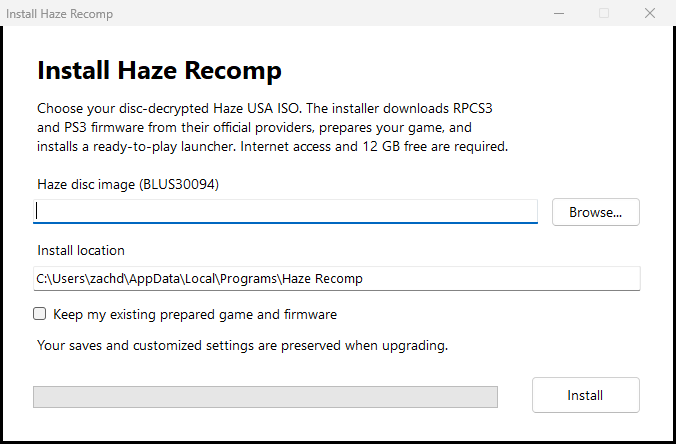
Haze Recomp 0.1.11 came out on October 16 as an experimental native Windows port of Haze, a PlayStation 3 game. It is built with ps3recomp, which generates native translations of the game and firmware code, so Haze runs as Windows code.
You need Windows x64, your own disc-decrypted copy of the USA disc (BLUS30094, disc version 01.02, application version 01.00), and an internet connection for the first install. Other regions, encrypted raw dumps and updated executables are not supported. The game files are not in the release, so you supply the ISO.
How to try it:
- Download
HazeRecomp-<version>-Setup.exefrom the Releases page of the project’s repo. - Run it, select your ISO, and click Install. The installer downloads the pinned RPCS3 helper and verified Sony firmware, then prepares the game.
- Click Play Haze when it finishes. After that, open Haze Recomp from the Start menu.
The installer is unsigned, so Windows SmartScreen may warn you. Setup checks the supported executable and firmware decoder hashes. If you want the portable ZIP instead, the data has to be prepared already.
This release swaps out repeated CPU work for cheaper paths and adds a few guarded helpers. It also replaces 0.1.10, which never shipped binaries because its build stopped before packaging. The developers say a gameplay FPS gain has not been established, since other workloads competed for CPU during the test run. They don’t promise 60 FPS.
What works: menus, opening gameplay, audio, checkpoint saves, keyboard, mouse and SDL controllers. Two-instance local co-op passed tests. Full campaign completion, online co-op, separate-machine play and every GPU are not validated. Back up your saves before you start.