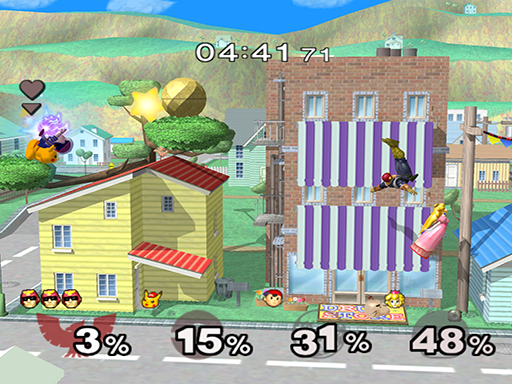
Super Smash Bros. Melee now runs on your Mac desktop in Desktop Melee 0.1.1
Desktop Melee 0.1.1 beta runs Super Smash Bros. Melee on macOS, with fighters on the Dock. Needs Apple silicon, macOS 27 and your own disc.
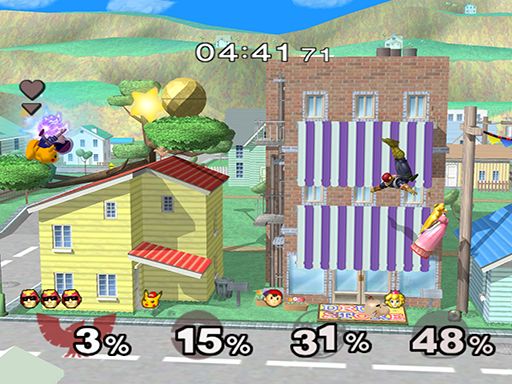
Desktop Melee 0.1.1 is a beta that runs Super Smash Bros. Melee, the GameCube fighter, on macOS. The fighters stand on the Dock, the screen edges act as blastzones, and your other apps keep running underneath. You need a Mac with Apple silicon and macOS 27. You also bring your own Melee disc image (USA 1.02, unmodified). The app ships no game data.
Desktop Melee is not an emulator. It runs Melee’s own code, taken from the community decompilation and built through melee-pc, so movement, hitboxes and knockback follow the original game. A layer called aurora maps the GameCube hardware calls to Metal and SDL3. One transparent, click-through window covers the screen and draws only the fighters, effects and HUD. Final Destination’s floor stretches to the width of your Dock, and the stocks and percents sit in a black island around the MacBook notch.
Version 0.1.1 changes the first run. Setup asks for your disc first. Once the disc checks out, the rest of the welcome window uses Melee’s own font, read from the disc. The Accessibility step now says what to click, including the case where the app shows as on but does nothing. Remove it and add it again. Start on a controller only begins a match when the Match tab says so.
To try it:
- Download
Desktop-Melee-0.1.1-macOS-arm64.zipfrom the releases page, unzip it and move Desktop Melee to/Applications. - Open the app. When macOS says it can’t check it for malware, click Done.
- Go to System Settings → Privacy & Security, find “Desktop Melee was blocked” and click Open Anyway.
The app isn’t notarized by Apple, so step 3 repeats with each new version. Accessibility permission also resets after every update, so add the app back to that list. The first launch takes about five minutes while the game builds its graphics shaders. Later launches take a few seconds.
Windows and Linux are in progress. Testing covered macOS 27 only. The pause shortcut is ⌃⌥M by default. The project is a fan build and has no ties to Nintendo or HAL Laboratory.
The code runs on your desktop, and physics match the disc. Windows and Linux builds are in progress using the same decompilation.