Crazy Taxi 2 gets a native Windows port through static recompilation
Developer Thiago86 released v15zzn of a static recompilation project that translates the US Dreamcast release of Crazy Taxi 2 into a native Windows executable.
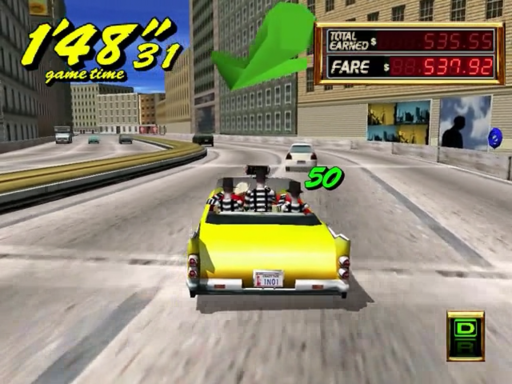
Developer Thiago86 published release v15zzn of ct2_recomp_Crazy_Taxi_2_Dreamcast_static_recompilation_e_sh4, a native Windows 10/11 (64-bit) port of Sega’s Dreamcast arcade racer Crazy Taxi 2. Rather than emulating the console, the project uses static recompilation: a Python tool (tools/sh4c.py) translates the original SH-4 machine code directly into C, then compiles it against a custom runtime that maps PowerVR graphics to Direct3D 11 and AICA audio to Windows.
Because the repository ships with zero copyrighted game data, you must supply your own disc dump and build the executable locally. The recompilation targets the US (NTSC-U) release exclusively, checking for volume name CRAZY_TAXI_2 and 1ST_READ.BIN v1.004 (SHA-1 bcff06e9defcd454d99ada84b9d26757e8ab4221). PAL and Japanese dumps are rejected because the translated code addresses do not match.
The Windows build adds widescreen support with an edge-culling fix, anisotropic filtering, keyboard and XInput controller support (including turbo dash), file-based VMU saves, and an options menu bound to the ESC key.
How to set it up
- Grab a dump of your US Crazy Taxi 2 disc containing both the
.gdifile andtrack03.bin. - Run
launcher\build.batto generate a self-contained folder underdist\CrazyTaxi2_<version>\. If Python 3 or a C compiler (gccorclang) is missing from yourPATH, the script automatically downloads portable versions of Python andw64devkitinto a localtoolchain\directory (internet access is required on the first run if they are not already installed). - Launch
CrazyTaxi2.exe, click SELECT FILES, and point it to your.gdiortrack03.binfile. - Wait for the launcher to verify the disc, extract assets, generate the C code, and compile the binary. Once finished, the PLAY button unlocks.
Caveats before you try it
Thiago86 notes that the core logic was developed and tested on Linux, leaving the Windows-specific components-Direct3D 11 rendering, win.c, build.bat, and the Win32 launcher GUI-only lightly tested. Expect rough edges on Windows setups, and allow a few minutes for the initial C generation and compilation pass to complete. Note also that the generated output folder contains code derived from the game and is strictly for personal use, not sharing.

