CHD Manager 1.4.0 sorts out multi-track CDs on its own
CHD Manager 1.4.0 adds a CHD files choice and automatic one-BIN-per-track extraction for Windows disc-image conversion.
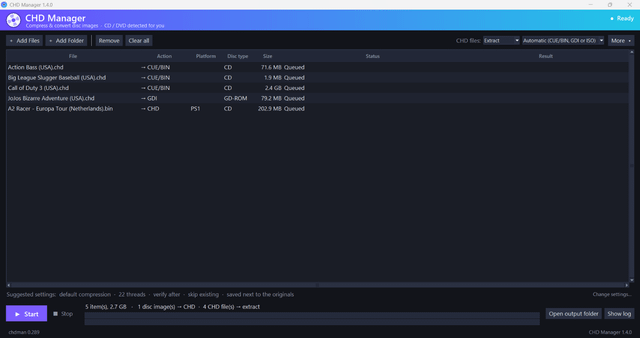
CHD Manager 1.4.0 came out on October 26. It’s a free, open source Windows app built on chdman, the command-line tool from the MAME project. It turns disc images into compressed CHD files and back, so you don’t have to type commands.
The main change is the CHD files choice. With a CHD in the queue, you pick Extract, Verify or Recompress with different compression. Recompress keeps your original file.
Extraction now counts the tracks first. A CD with audio and data gets one BIN per track, and a single-track disc gets one BIN. Split CDs and Dreamcast GDI output go into a folder named after the disc. ISO output appears only when nothing would be lost. The release notes say multi-track CDs rebuilt with identical data checksums.
How to try it:
- Download
CHD-Manager-1.4.0-win64.zipfrom the GitHub releases and check its SHA-256 against the one in the release notes. - Unzip it anywhere and run
CHD Manager.exe. You need Windows 10 or 11, 64-bit. Python isn’t needed, and chdman 0.289 is in the zip.
The exe isn’t code-signed, so SmartScreen may show an “unknown publisher” warning. Choose More info, then Run anyway. Some antivirus tools flag packaged Python apps, and you can run CHD_Manager.pyw from source instead.