BlackKnightRecomp 1.0 brings Sonic and the Black Knight to Windows natively
BlackKnightRecomp v1.0.0 runs the Wii game Sonic and the Black Knight natively on Windows x64 with controller support. You still need your own disc.
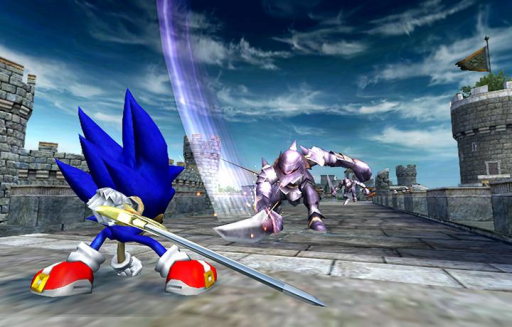
BlackKnightRecomp v1.0.0 is out, and it runs Sonic and the Black Knight, a Wii game, natively on Windows x64. This is the first public release of a static recompilation: the game’s PowerPC machine code is translated ahead of time into C++, then built into a Windows program. You play with a normal controller instead of waving a Wii Remote.
The zip contains no game data. You need your own PAL disc (RENE8P) as an ISO, RVZ, WIA or WBFS file. On first start the launcher asks for the image, installs about 3.5 GB of game data in roughly a minute, and then doesn’t need the image again. The game requires Windows 10 or later and a Direct3D 11 GPU.
The README says the project is written in the spirit of UnleashedRecomp, Hedge’s Sonic Unleashed recomp. It describes a recompiler that decodes the Gekko/Broadway instruction set, runs the game’s own Revolution OS in recompiled form, and emulates the hardware and IOS layers. Graphics go through Direct3D 11 with generated shaders, and audio goes through a port of Dolphin’s AX HLE into XAudio2.
For players, the main changes are controller input, where XInput pads and the keyboard stand in for the Wii Remote and Nunchuk. Sword swings are synthesised from accelerometer pulses. The release adds 16:9 widescreen, a higher internal resolution, a 60 FPS option with game logic still fixed at 60 Hz, and Dolphin-format HD texture packs. Changing resolution or texture pack restarts the game. At 60 FPS a full jump comes out about 2.5% higher, because part of the original movement code runs per rendered frame. The author left that alone to keep the game logic unchanged.
To try it:
- Unzip the Windows x64 build anywhere on your PC.
- Run
BlackKnightRecomp.exeand select your disc image in the file dialog. - Wait for the install to finish, then click Play.
The setup is simple: your own disc, a launcher that does the extraction, and no game data in the download. The 60 FPS jump difference is listed as a known limitation.