Windows XR streams PC apps into Quest windows, in preview
Windows XR is an independent preview that streams Windows apps to Meta Quest as separate Horizon OS windows.
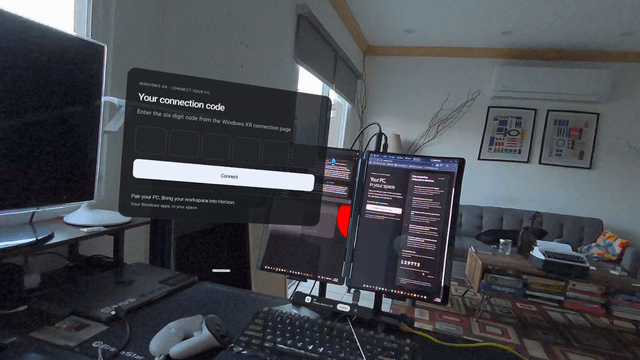
Windows XR is an independent project that streams Windows apps into a Meta Quest headset. Each app opens in its own window inside Horizon OS. You move and resize it with Horizon native controls. The PC runs the apps. The headset sends your pinches, controller triggers, and typing back over the local network.
The developer built it on a Quest 3S and focused on keyboard input, window resizing, and connection recovery. You do not need Virtual Desktop or Meta Link. It is a preview distributed through an unsigned Windows installer and a sideloaded Quest APK. Compatibility and responsiveness depend on the Windows app, your PC, and your network.
How to try it:
- Turn on Mobile hotspot in Windows and connect the Quest to that network. Keep it on for the whole session.
- Run the Windows XR Connect installer and open it from Start. Keep it running.
- Select Get my code, allow local network access, and choose the hotspot network. Then select Allow connection.
- Install the Quest APK with Package Installer, then open Windows XR from Unknown Sources. Downloading the APK does not install it.
- Enter the six-digit code in Windows XR on the headset before the splash plays.