StereoLive 3D adds Quest Browser streaming with audio
StereoLive 3D 0.11.2 adds Quest Browser streaming with audio for live flat-to-SBS 3D on Windows. NVIDIA GPU only, still beta.
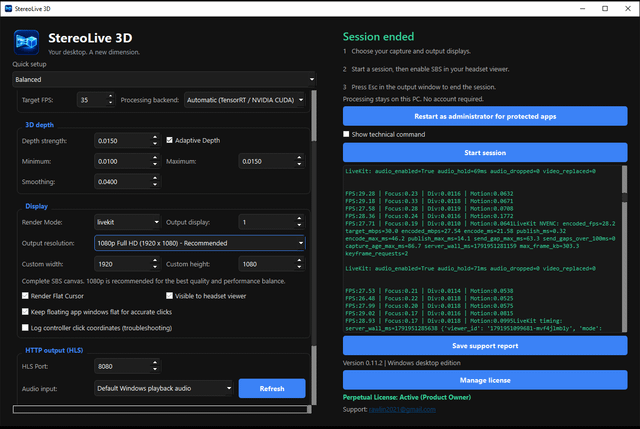
StereoLive 3D, a Windows app that turns a flat screen or window into live side-by-side (SBS) 3D, can now stream the result straight to the Meta Quest Browser. Version 0.11.2 adds LiveKit browser streaming with audio, so you no longer need Virtual Desktop for that route. You still need an NVIDIA GPU.
The developer, who posts as Gullible-Reaction904 on r/virtualreality, tested it on a GTX 1660 Ti. They report 28 to 30 FPS at 1080p, about 26 FPS at 1440p and around 14 FPS at 4K, which they think is not worth it on that card. The project page lists 23 to 25 FPS on the same GPU. Browser streaming is still beta, and the author sees short pauses now and then.
To try it:
- Put the PC and the Quest on the same network, set the Windows profile to Private, and use Ethernet on the PC if you can.
- In StereoLive 3D, pick Balanced, the screen or window, and set Render Mode to livekit. Leave the port at 8080.
- Select an audio source, then start with a 30 Mbps maximum and adaptive bitrate turned on.
- In Quest Browser, open the address from the session log, such as http://192.168.1.20:8080/, and press Connect with audio.
- Go fullscreen, then choose SBS/3D in the video controls. Fullscreen alone won’t give you 3D.
The trial lasts seven days with one rendering hour per UTC day. Remote desktop controller input is not supported in browser mode. According to the project page, Virtual Desktop typically looks sharper and responds faster than browser streaming, depending on your PC and Wi-Fi. The author recommends TensorRT for speed. Without it, the app falls back to CUDA.