Mixtape v0.1.10 adds an amber OnionOS theme and fixes the Homebrew Hub sync
Mixtape, the app store for OnionOS on the Miyoo Mini Plus, gets a theme, a new sort order and a sync bug fix.
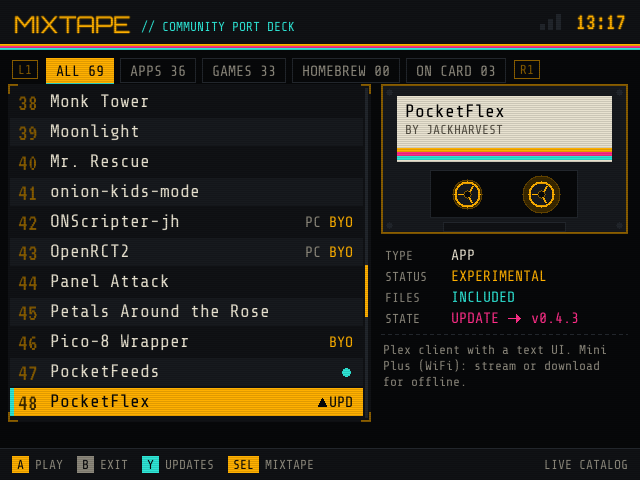
Mixtape v0.1.10, released October 15, is an app store for OnionOS, the custom system on the Miyoo Mini Plus handheld. It installs community ports and homebrew over Wi-Fi, so you don’t need to pull the SD card.
This release adds a theme, a new sort order and a sync fix. The theme recolors OnionOS in amber on black, with scanlines and a cassette on the Games tile. Press SELECT, choose Install Mixtape theme, then pick Mixtape in Apps → Theme Switcher. If you want Mixtape as its own system on the home screen, turn on Mixtape in Games list in the SELECT menu.
The HOMEBREW tab now sorts by newest, A-Z, release date or shuffled. There’s no “most popular” option, because Homebrew Hub keeps no download counts or ratings. The notes also fix a bug where the full Homebrew Hub sync could skip games. Mixtape was sending parameter names from Homebrew Hub’s docs that its API ignores.
The project comes from @snyderman3000. The README says Claude wrote the code, docs and artwork, while he picked the direction and tested on real hardware. Bug reports go to the project’s Issues page.