Menu Bar Emulator 1.0 puts Game Boy, GBA and DS in your Mac's menu bar
A free Mac emulator for Game Boy, GBA and DS games hit 1.0. It runs on Apple Silicon with macOS 26 and needs a manual override in System Settings.
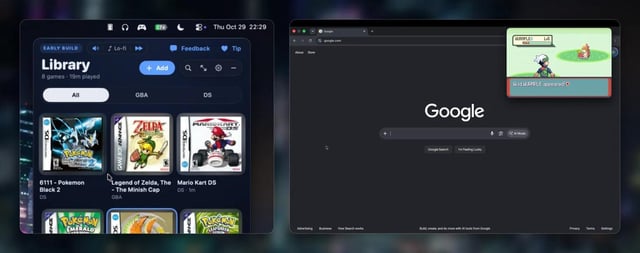
Menu Bar Emulator 1.0 is out. It’s a free emulator for Apple Silicon Macs on macOS 26, and it runs Game Boy, Game Boy Color, Game Boy Advance and Nintendo DS games from the menu bar. Kian, a university student who makes small Mac apps for fun, built it so he could play Pokemon between other things without opening a full emulator. Click away and the game pauses and saves.
Under the hood it’s a shell around two existing cores: mGBA for the Game Boy line and GBA, and melonDS for DS. The new work is the front end: a dropdown window, any game controller, fast-forward up to 16x, rewind, save states, 12 DS screen layouts, and a floating window you can shrink into a corner. It also handles IPS, UPS and BPS patches and cheats. The lo-fi soundtrack is generated in code, according to the readme.
How to try it:
- Download the zip from the GitHub releases page and drag the app into Applications.
- macOS blocks the first launch because the build isn’t notarized. Open System Settings, go to Privacy & Security and click Open Anyway.
- The welcome tour handles setup. No games, BIOS files or saves are included, so add your own ROMs.
The author calls this an early build and says things might break. Feedback goes through the Ko-fi page.