Home5 1.0.1 lets you build your own rooms for Home Assistant on PS5
Home5 1.0.1, a homebrew app for jailbroken PS5 consoles, adds rooms you make yourself for Home Assistant, controlled with the DualSense.
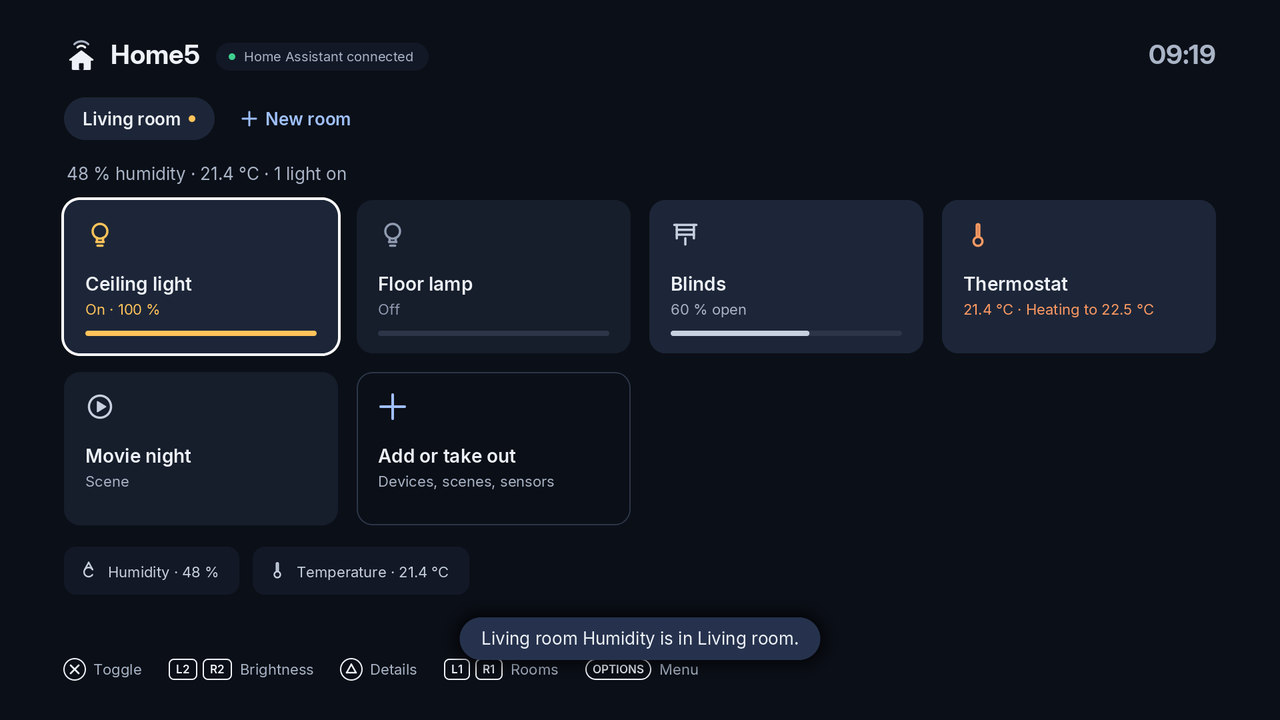
Home5 1.0.1 is out. It is a homebrew app for jailbroken PS5 consoles that brings Home Assistant, the smart-home software, onto the console. You switch lights, open blinds, set the heating and run scenes with the DualSense, and the light bar follows the colour of the light you have open.
The main change is rooms. Earlier, Home Assistant’s areas showed up as rooms. Now the first start asks you to name a room and pick what goes in it. Rooms sit as tabs along the top of the screen, and scenes and scripts appear as cards. Rooms exist only on the PS5, so Home Assistant itself stays as it was. Rooms you made in 1.0.0 carry over.
How to try it:
- Copy the
PPSA11019folder fromPPSA11019.zipto the console, the way you add other homebrew, for example to/data/homebrew/for ShadowMountPlus. Start Home5 from Media. - Enter your Home Assistant address with its IP, such as
http://192.168.1.20:8123. The namehomeassistant.localdoes not work on the PS5. Sign in with your username and password, or put a long-lived token inhome5.txton a USB drive and choose that option. Delete the file afterwards. - Press ✕ to make your first room.