Digimon World 1 Lands on PS Vita as a Native Port Built With Claude
Digimon World 1 arrives on PlayStation Vita and PlayStation TV as a native port built using Claude, featuring widescreen, optional HD assets, and bug fixes.
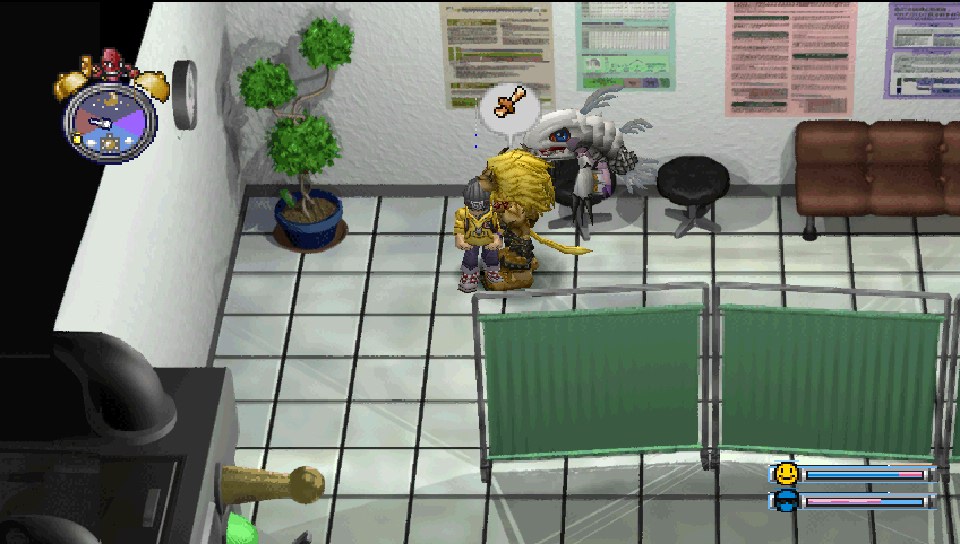
Developer danicannt released a native PlayStation Vita and PlayStation TV port of Digimon World, the classic monster-raising RPG. It was built with Claude on top of the community decompilation of the game. The game code is compiled for the Vita and runs natively, with the PlayStation hardware replaced by a modern renderer, rather than through an emulator.
Version v0.1.1-test is a test build and has rough edges. It adds widescreen 16:9 support with the HUD moved toward the screen edges, polygon wobble correction, and optional model depth fixes and 3D texture filtering. Those two options cost some performance and are off by default. The build also includes original bug fixes from the Vice ROM hack, smoother audio sample interpolation, a fair bonus try with no hidden slot-machine rigging, and battle stat gains that depend on how the Digimon actually fought. Controls map movement to the left stick, walking and petting to the touch screen, quick feeding to L1, and saving through a Start button pause menu. Save files use raw 128 KB PlayStation memory card format, so they can move between the Vita and DuckStation or ePSXe.
How to try it:
- Make sure you have a PlayStation Vita or PlayStation TV running HENkaku or Ensō, with VitaShell installed.
- Download the
dw1-vita.vpkfrom the danicannt/dw-vita release page and install it. - Prepare a personal disc dump of the USA version (SLUS-01032) as
.binand.cuefiles, then place them inux0:data/dw1/asDigimon World (USA).binandDigimon World (USA).cue. - Launch the game from the LiveArea.
The HD backgrounds, object sprites, and intro movie are optional packs and are not included in the VPK. They ship as separate .dw1hd files locked with data from your disc, so they work only with your own copy of the game. Unzip dw1-hd-unlocker.zip, put the packs in that folder, and drag your .cue onto unlock_hd_pack.bat (on Linux or macOS, run unlock_hd_pack.py) with Python 3 installed. Then copy the hd folder it creates to ux0:data/dw1/. The HD object sprites are experimental.
Two weeks went into testing, rebuilding, debugging and patching. The author asks players to report what they find, and the release post lists known issues.